
Let’s say you just launched a new website. You have published your pages, added your content, and shared your website with your audience. Now comes the important question: How will Google find everything? Search engines are powerful, but they still need signals to understand your website. A sitemap function that signals. It helps Google discover your pages, understand your website structure, and identify the content you want to be found. Understanding the sitemap function is one of the first steps toward improving your website’s search visibility. So, let’s help you with sitemaps.
What Is a Sitemap?
Credit: buglady.com
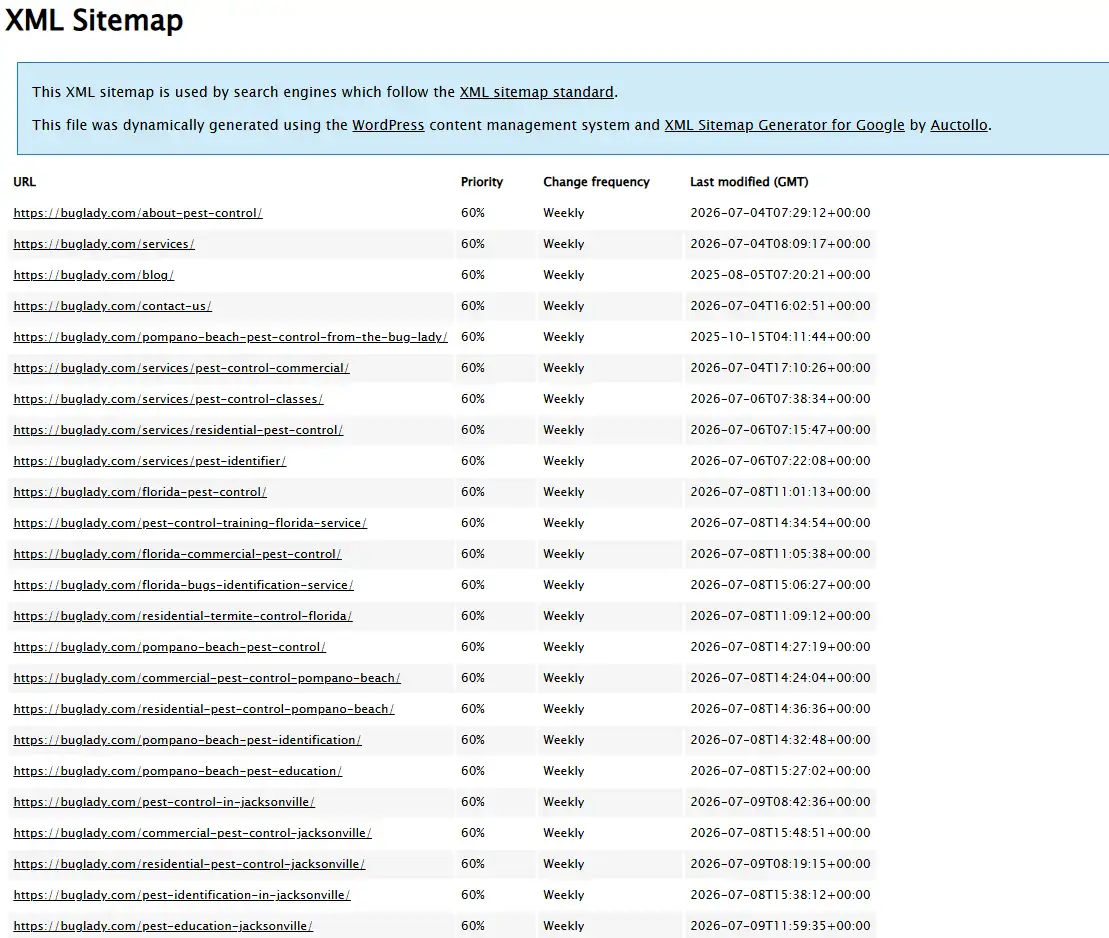
A sitemap is a file that lists important pages of a website and provides information about its content structure.
The main purpose of a sitemap is to help a search engine crawler understand your website.
A crawler, also known as a web crawler, scans websites to discover new pages and updates.
Without a sitemap, search engines can still find pages through links.
However, websites with complex structures may benefit from providing additional guidance.
A sitemap helps search engines understand:
- Which pages are available.
- Which pages are important.
- When pages were updated.
- How website architecture is organized.
For example, an ecommerce website may have thousands of product pages.
A sitemap helps Google discover these pages more efficiently.
The same applies to blogs, news websites, and large business websites.
What Is the Sitemap Function?
Credit: semrush.com
The sitemap function refers to the role a sitemap plays in helping search engines discover and process website content.
The simplest explanation is this:
A sitemap helps Google understand your website.
It creates a connection between your website and search engines.
When Google discovers your sitemap, it can better understand your available URLs and decide which pages need crawling.
The sitemap function supports:
- Website discovery.
- Better crawling.
- Faster content updates.
- Improved indexing processes.
However, Google still evaluates each page separately.
A sitemap does not guarantee indexing.
Google considers other factors, including:
- Content quality.
- Internal linking.
- External links.
- Website authority.
- User experience.
How Does Sitemap XML Work?
Most websites use XML sitemaps.
But many users wonder how sitemap XML works.
An XML sitemap is a structured file created specifically for search engines.
It contains URLs and additional information about those pages.
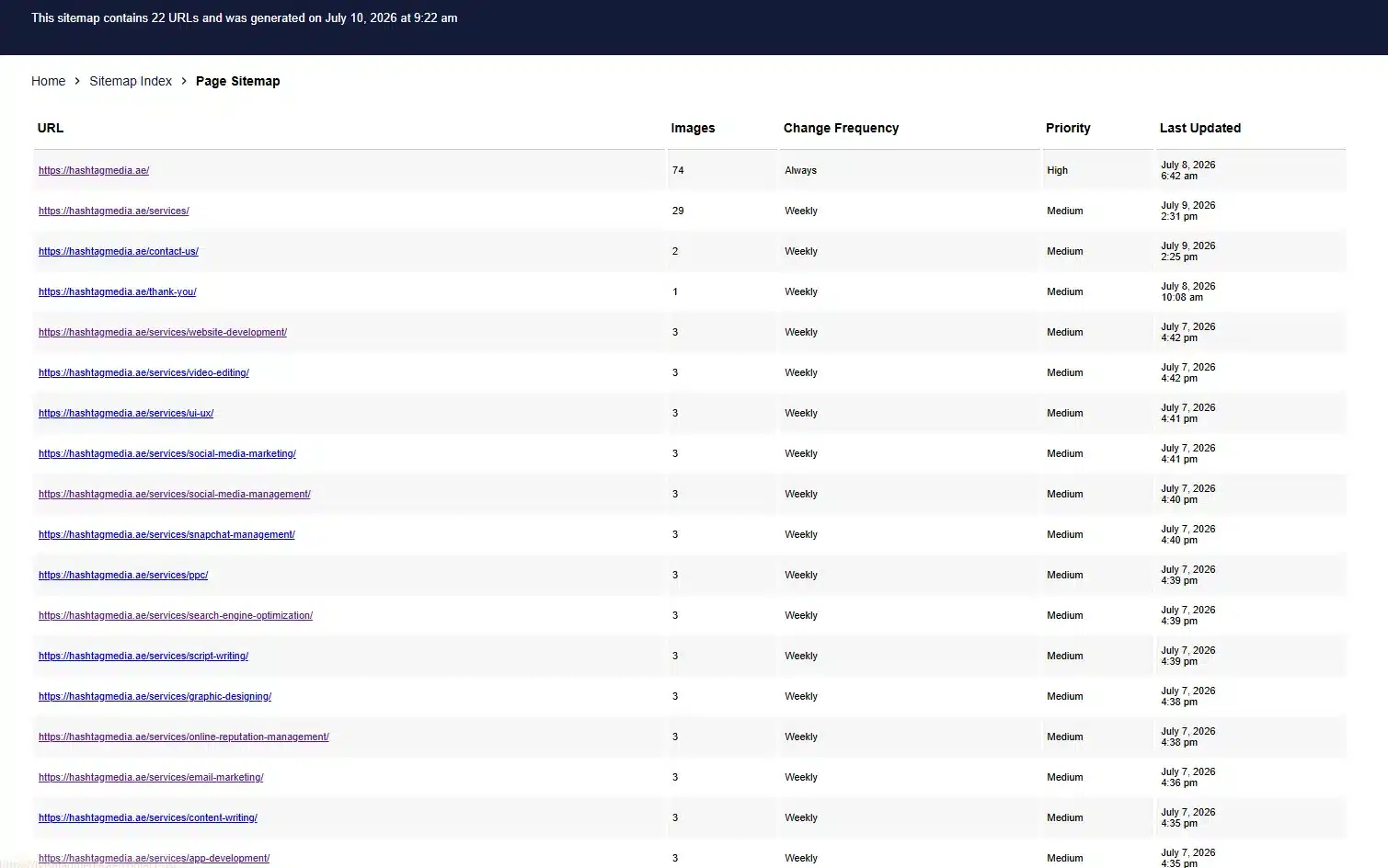
A typical XML sitemap includes:
- Website URLs.
- Last modification dates.
- Content update frequency.
- Sitemap priority information.
The sitemap priority value helps indicate which pages may be more important compared to others.
However, Google does not rely only on this value.
It uses many signals when deciding what content to crawl and index.
Understanding how sitemap looks like is simple.
It usually appears as a structured list of URLs rather than a normal webpage.
How Does a Sitemap Help Google Indexing?
Credit: markthomasmedia.com
Google follows three main steps:
- Crawling.
- Indexing.
- Ranking.
During crawling, Googlebot discovers website content.
For indexing, Google analyzes and stores information about pages.
During ranking, Google determines where pages appear in search results.
The sitemap function mainly supports crawling and indexing.
A sitemap helps Googlebot discover important URLs.
However, you may wonder:
How does Googlebot decide which sitemap to crawl first?
Google considers multiple signals, including website size, update frequency, and crawl demand.
For websites with multiple sitemaps, crawl budget also becomes important.
The way crawl budget prioritizes multiple sitemaps in robots.txt depends on Google’s ability to efficiently crawl valuable content.
Googlebot does not simply crawl every URL immediately.
It prioritizes based on importance, freshness, and website signals.
Types of Sitemaps You Should Know
Different websites require different sitemap types.
XML Sitemaps
These sitemaps are the most common.
They are created for search engines and support website crawling.
HTML Sitemaps
HTML sitemaps are created for users.
They help visitors navigate large websites.
Image Sitemaps
Such sitemaps help search engines discover visual content.
They are useful for photography websites, online stores, and websites that rely heavily on images.
Video Sitemaps
A video sitemap helps search engines understand video content.
It provides information about video titles, descriptions, and locations.
Mobile Sitemaps
These sitemaps were previously useful when mobile websites were commonly separate from desktop websites.
Today, responsive websites are more common, but mobile optimization remains important.
Ecommerce Sitemaps
An e-commerce sitemap helps online stores organize product URLs and improve product discovery.
How to Find a Sitemap of a Website?
Credit: hashtagmedia.ae
Many users don’t know this.
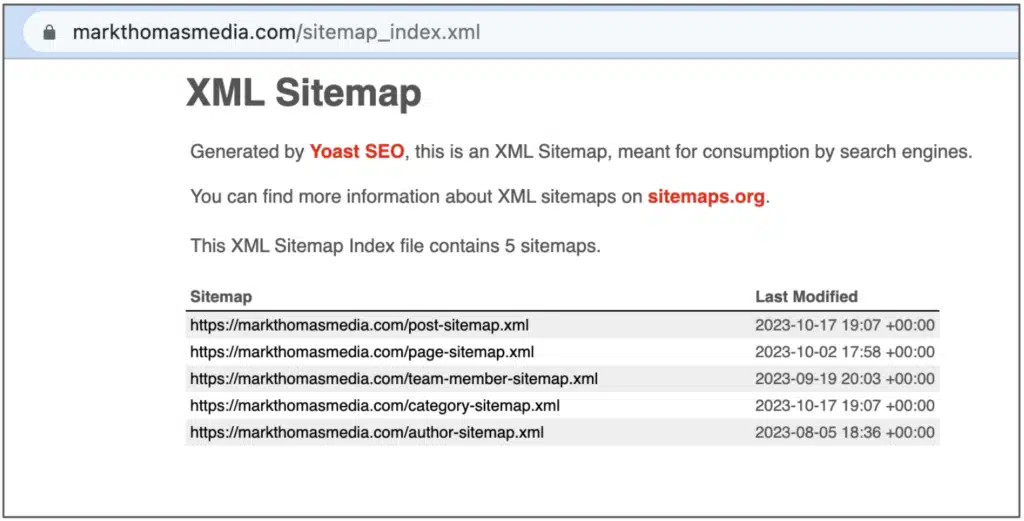
The easiest method is checking common sitemap locations.
Try:
- yourwebsite.com/sitemap.xml
- yourwebsite.com/sitemap_index.xml
You can also use a sitemap checker or sitemap validator tool.
These tools help identify whether a sitemap exists and whether it contains errors.
A sitemap checker can reveal:
- Broken URLs.
- Missing pages.
- Error pages.
- Indexing problems.
Sitemap Function in WordPress: How Does It Work?
Many website owners use WordPress and ask about the sitemap function in WordPress.
Modern WordPress websites automatically generate XML sitemaps.
This means many users do not need to create one manually.
However, SEO plugins can provide additional control.
They allow businesses to manage:
- Included pages.
- Excluded pages.
- Sitemap structure.
- Content priorities.
While creating a sitemap is an important step, getting indexed requires a complete SEO approach. Search engines also consider factors like website structure, content quality, internal linking, and technical performance.
If you want to improve your website’s chances of getting discovered and indexed, our SEO services at Hashtag Media focus on technical optimization, content improvements, and strategies that help businesses build stronger search visibility.
Some users also ask, “Why does wordpress.org not have a sitemap function?”
The answer is that WordPress.org is a platform and community resource, while individual WordPress websites generate their own sitemap files.
The sitemap function depends on the website setup, plugins, and content management system.
Sitemap Best Practices You Should Follow
Following sitemap best practices helps search engines understand your website better.
A good sitemap should:
- Include important pages only.
- Remove outdated URLs.
- Avoid broken links.
- Match your website structure.
- Update when new content is added.
You should also avoid including:
- Duplicate pages.
- Error pages.
- Noindex pages.
- Low-value content.
A sitemap should support your SEO strategy, not create confusion.
Should I Add Sitemap to Robots.txt?
Credit: semrush.com
Many website owners ask:
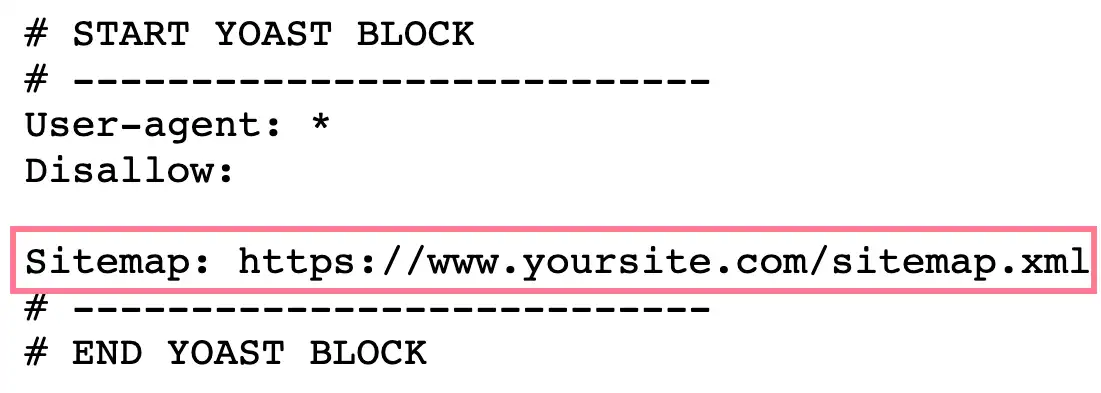
“Should I add sitemap to robots.txt?”
The answer is yes; it can be helpful.
Adding your sitemap location to robots.txt provides another way for search engines to discover it.
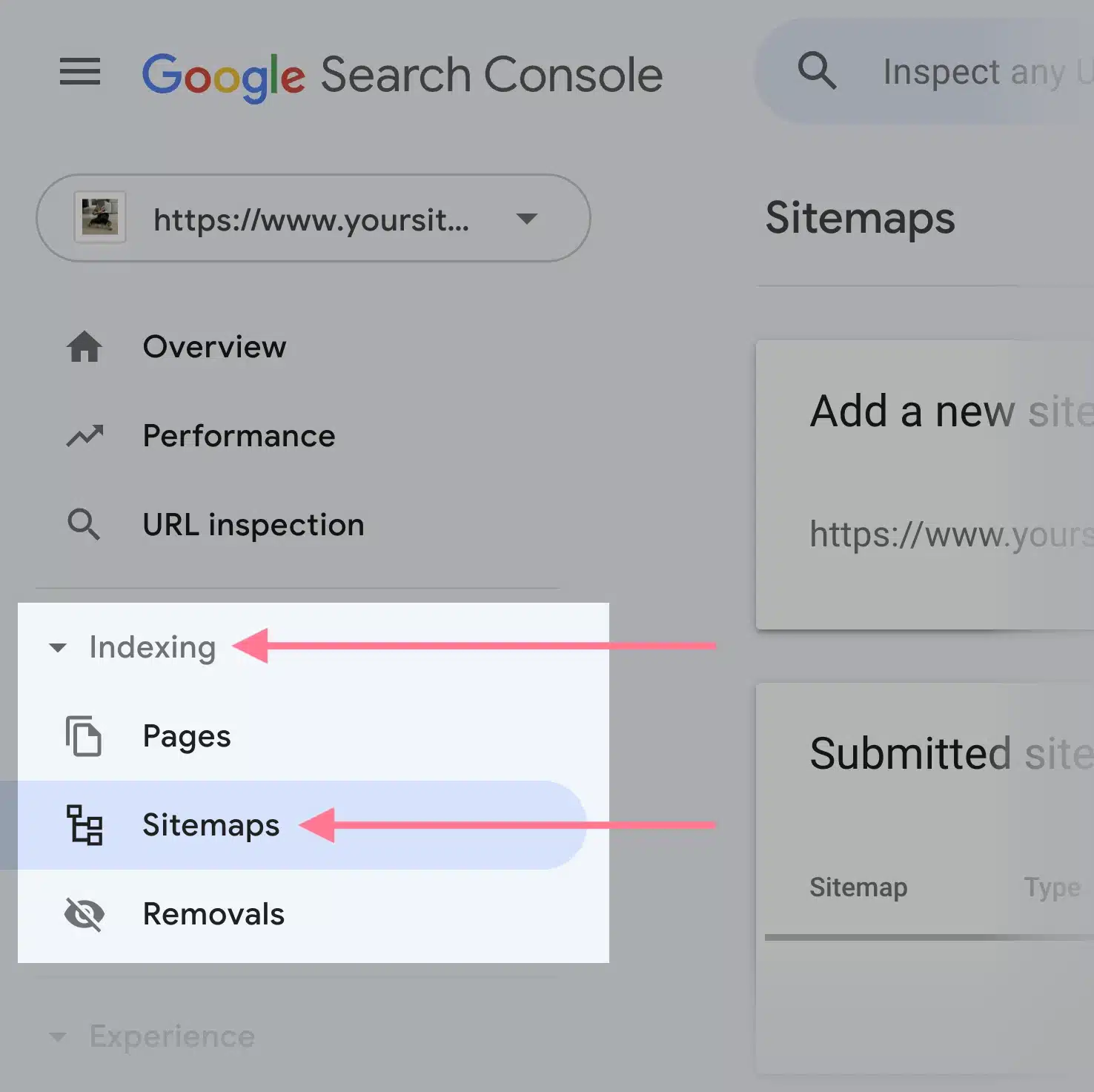
However, submitting your sitemap through Google Search Console is still recommended.
Search Console also allows you to monitor:
- Sitemap errors.
- Indexed pages.
- Crawl issues.
How to Create, Download, and Check a Sitemap?
Many tools can help you create and download sitemap files.
If you are wondering how to get a sitemap, your CMS or SEO tools can usually generate one automatically.
After creating your sitemap, you can:
- Download sitemap files.
- Submit them to Google Search Console.
- Check them using sitemap validator tools.
Regular monitoring helps identify technical problems before they affect visibility.
Final Words
The sitemap function plays an important role in helping Google discover and understand website content.
A sitemap acts as a guide that connects your website with search engines.
It does not guarantee rankings, and it does not replace quality content or SEO optimization.
However, it creates a stronger foundation for crawling and indexing.
Whether you manage a small blog, an e-commerce store, or a large business website, a properly created sitemap helps search engines understand your content better.
When combined with strong internal linking, quality content, and technical SEO practices, a sitemap supports better search visibility.
Frequently Asked Questions
Whether you are managing a new website or improving an existing one, these FAQs explain the basics of sitemaps and their impact on search visibility.
What is the function of a sitemap for a website?
The function of a sitemap is to help search engines discover and understand website pages. It provides a structured list of important URLs.
Do all websites have a sitemap?
No, not all websites have a sitemap. However, having one is recommended for large websites, new websites, and websites with frequently updated content.
Who uses sitemaps?
Sitemaps are mainly used by search engines like Google and Bing to discover and crawl website content.
How do I find my website sitemap?
You can find a sitemap by checking common locations like /sitemap.xml or /sitemap_index.xml or by using a sitemap checker tool.
How often should I update my sitemap?
Your sitemap should update whenever you publish new pages, remove content, or make major changes to your website structure.